Find WordPress accessibility issues before your visitors do — right where they live.
DigitalPlugs ADA Compliance scans every post, page, widget and template, marks each issue directly on the live page, and fixes what's safe to fix automatically. No account, no per-page fees, nothing sent off your server.
Free forever for posts & pages. Pro adds full-site scanning, auto-fix and reporting.
Accessibility lawsuits don't check if you meant to comply.
Web accessibility claims under the ADA have become a routine cost of doing business online, and small and mid-size sites are no longer exempt. Most owners find out their site has a problem when a demand letter arrives — not before.
- ✕ Manual audits are slow, expensive, and stop the day you stop paying for them.
- ✕ Generic overlay widgets paper over issues instead of fixing your actual markup.
- ✕ Most scanners only check what's visible on the page — not widgets, menus, or theme templates.
One plugin that finds issues, shows you where they are, and fixes what it safely can.
Not a black-box overlay. DigitalPlugs ADA Compliance scans your actual markup against WCAG 2.2, Section 508 and the EAA, and gives you a real, editable trail from "found" to "fixed."
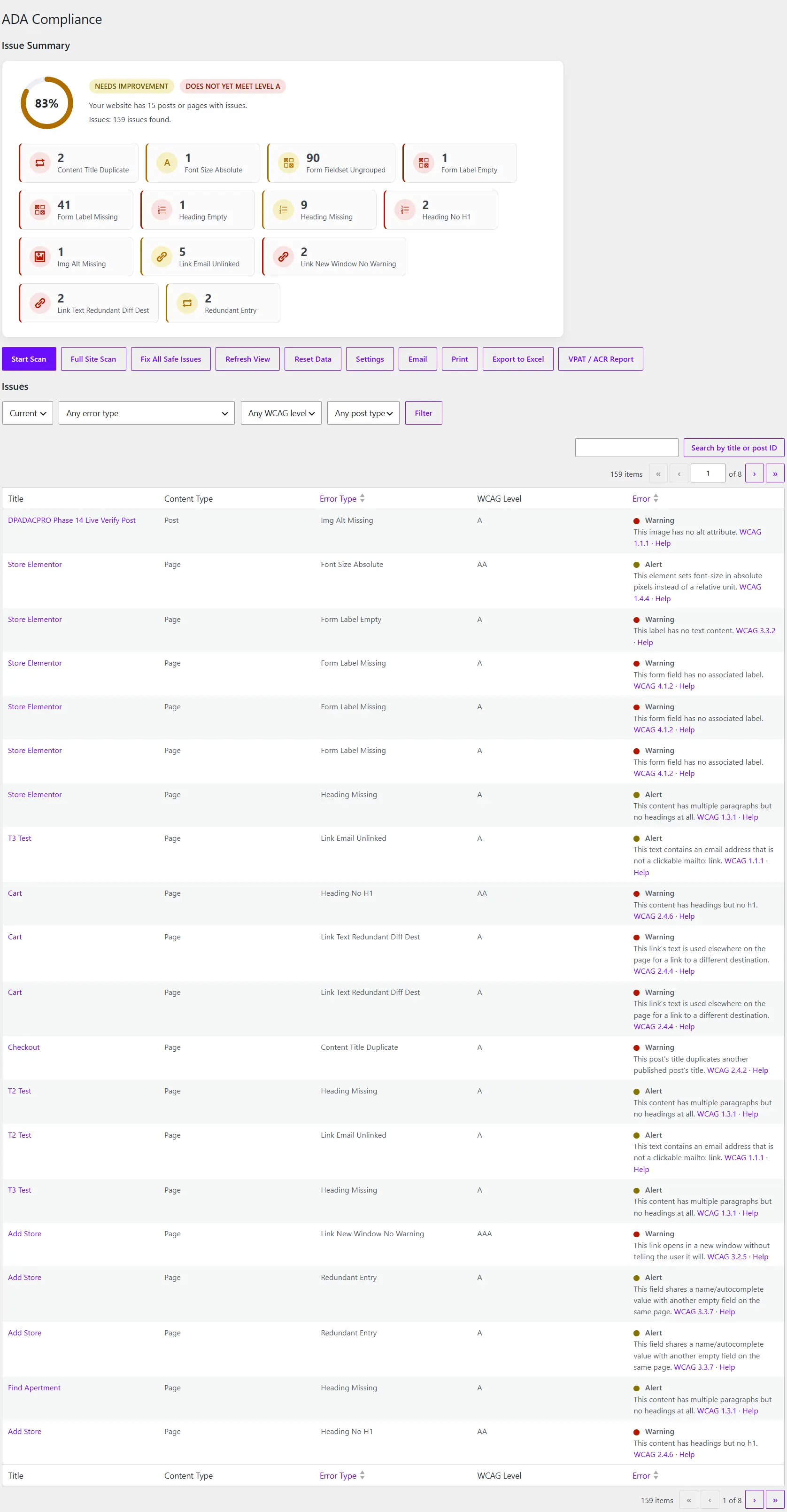
One dashboard, your whole site's health at a glance
A live score ring, plain-language status pills ("Needs Improvement," "Does Not Yet Meet Level A"), and every open issue in one filterable, searchable table — by error type, WCAG level, or post type.
- Issues grouped by rule so patterns jump out immediately
- One click each for Full Site Scan, Fix All Safe Issues, or Export to Excel
- Search any issue by title or post ID
Configured the way your site actually works
Choose exactly which content types get scanned, which standard you're held to (WCAG 2.2 AA, Section 508, or the EAA), and who on your team can view, fix, or export issues — right down to WooCommerce roles like Shop Manager and Shop Vendor.
- Per-role permission matrix, not just Administrator-only
- HMAC-signed webhooks the moment a new issue appears
- White-label your agency name, logo and accent color

Reports that mean something PRO
Generate a dated VPAT / ACR PDF mapped straight from your live issue data (supporting evidence for a conformance evaluation, never sold as a guarantee), export everything to Excel, or hand a client a signed, read-only summary link — branded with your white-label settings, no wp-admin login required, revocable any time.
- Each client link gets its own label and expiry date, and can be revoked instantly
- Scheduled scans with an email digest only when something's new

Every check, cited and explained
Nothing here is a black box. Every one of the 57+ checks links straight to the WCAG success criterion it enforces and explains exactly how to fix it — the same reference your team, or your clients, can read without asking you first.
- Split into Warnings (must-fix) and Alerts (should-fix)
- Changes automatically when you switch compliance standards

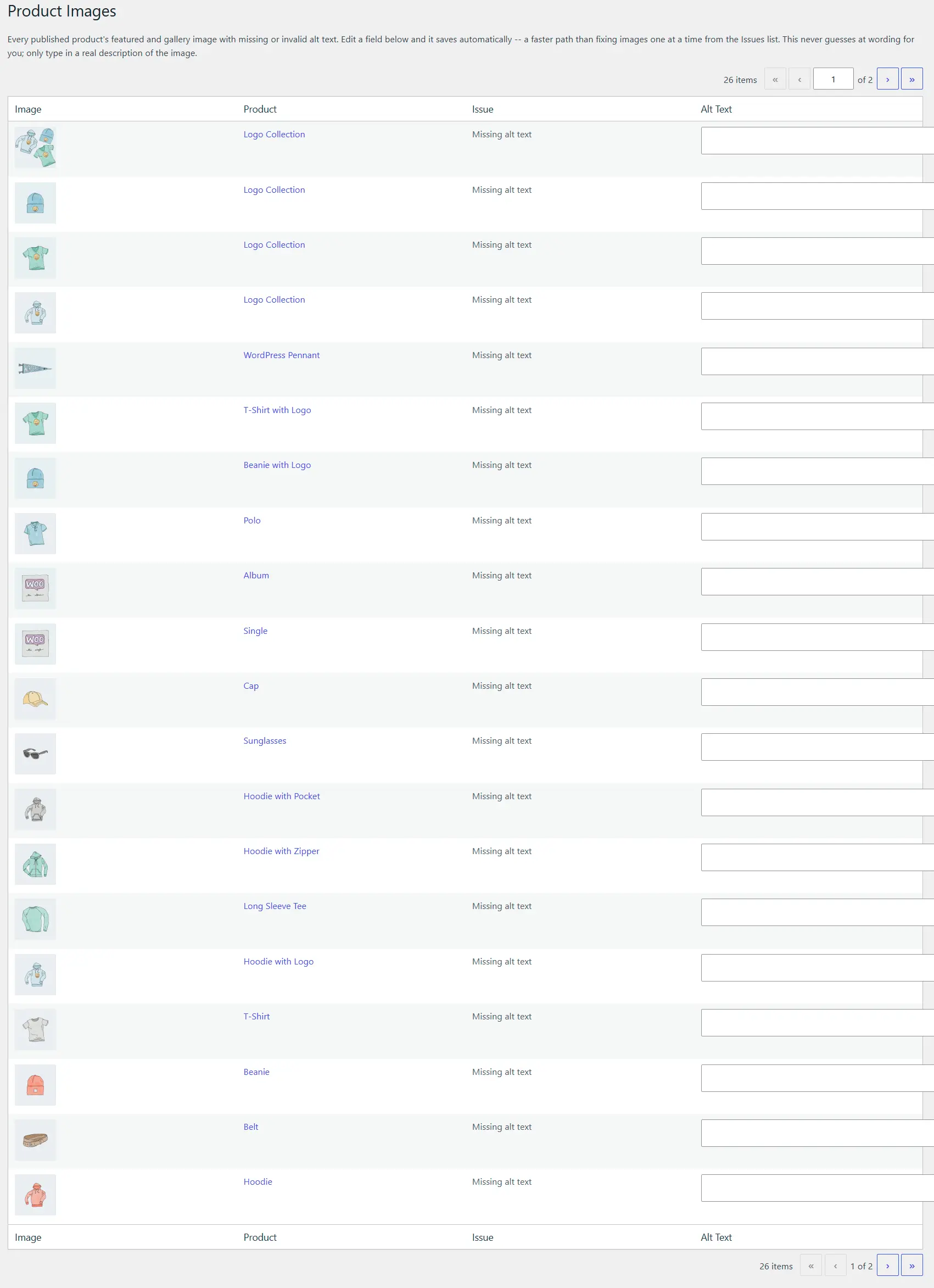
Bulk-fix WooCommerce alt text in minutes PRO
Every published product's featured and gallery image with missing or invalid alt text, listed in one place with an inline field that saves as you type — faster than fixing images one at a time from the issues list.
- Never guesses at wording for you — only a real description you write counts
- Product thumbnail and name shown right next to each field
Documented evidence for your conformance file PRO
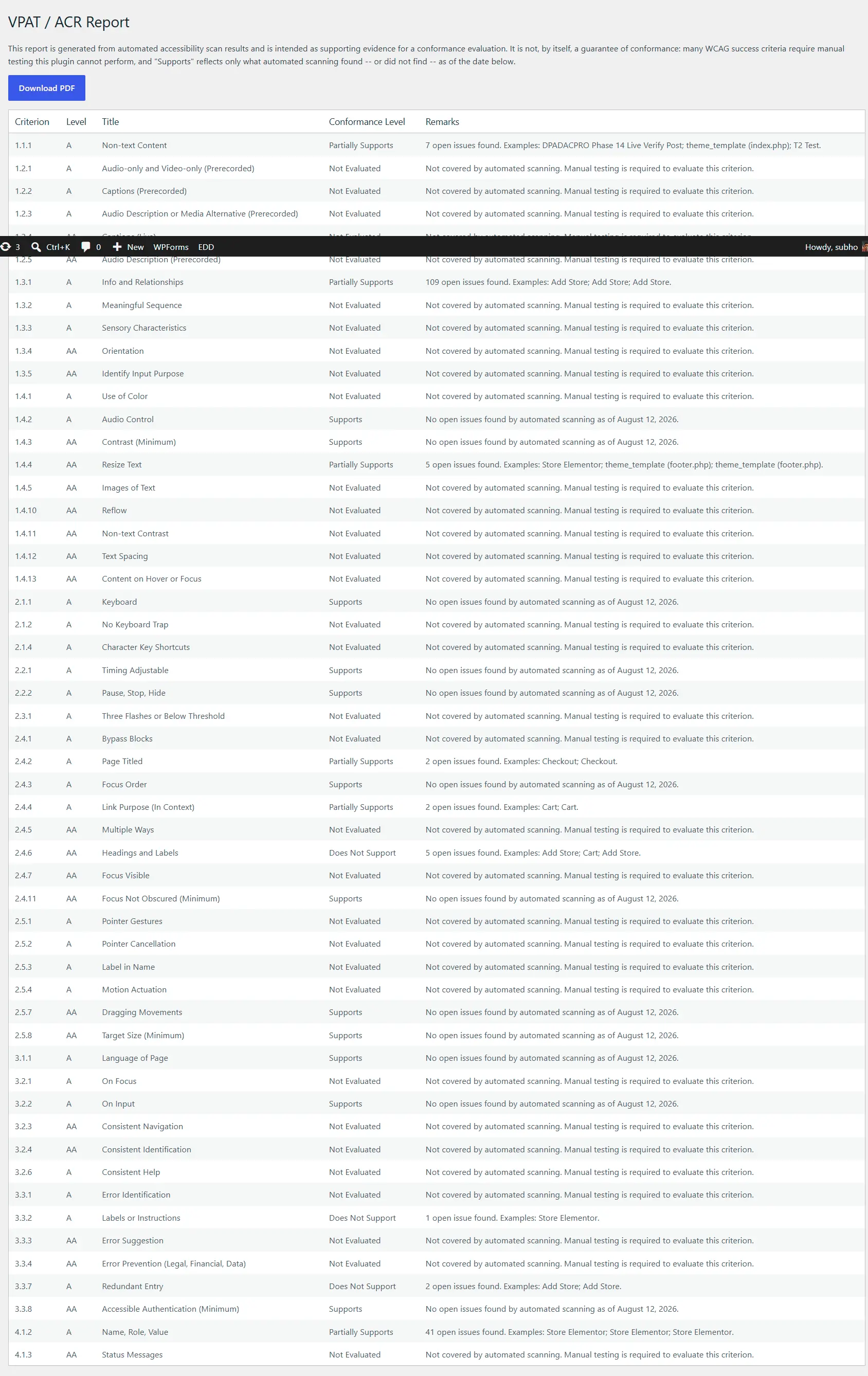
A criterion-by-criterion VPAT / ACR table — Supports, Partially Supports, Does Not Support, or Not Evaluated — generated straight from your live scan data, with real examples cited for every gap.
- Download as a PDF, dated and ready to attach to a procurement file
- Says plainly where automated scanning can't reach — never oversells what it found
Real-time scanning as you write
Free — every post and page is checked the moment you save it, right in the editor sidebar.
See issues right on the page PRO
Toggle the front-end checker from the admin bar and every issue appears as a marker on the actual element — tab through them in reading order, or hear each one read aloud by the built-in Screen Reader Simulator.
Full-site scanning PRO
Posts, pages, media, Elementor floating elements and saved templates, WooCommerce products and any custom listing type — not just posts and pages.
Real WCAG level tracking
Not just a percentage — know exactly which conformance level (A, AA or AAA) your site actually meets, per page and site-wide.
WP-CLI, REST API & webhooks PRO
Trigger scans from CI, pull results headlessly, or get an HMAC-signed webhook the moment a new issue appears.
Built for agencies PRO
White-label your agency name, logo and accent color (client reports, or the whole admin menu), granular permissions down to roles like Shop Manager and Shop Vendor, and a multisite network rollup.
WooCommerce-ready PRO
Every product image missing alt text, listed in one place with an inline field that saves as you type. It never guesses at wording for you — only a real description you write counts.
Elementor-aware checks
Catches what generic scanners miss on Elementor pages: autoplaying carousels and background video with no pause control, fake accordion toggles, and table-of-contents links that no longer point anywhere.
Visitor accessibility toolbar PRO
An optional floating widget your visitors can use to adjust text size, contrast, link underlining and focus visibility. Preferences stay in their own browser — nothing is sent to your site. It helps some visitors; it's not a substitute for fixing the underlying issues.
Start free. Upgrade when you need the rest of your site covered.
Every check the free plugin runs keeps running forever, even without Pro. Nothing you already have ever gets taken away.
| Free | Pro | |
|---|---|---|
| Posts & pages scanning (WCAG 2.2, 508, EAA) | ✓ | ✓ |
| Editor sidebar, real-time checks | ✓ | ✓ |
| Guidelines reference & WCAG level per issue | ✓ | ✓ |
| Full-site scanning (media, Elementor templates, products & more) | — | ✓ |
| Visitor accessibility toolbar (text size, contrast, focus) | — | ✓ |
| Front-end accessibility checker overlay | — | ✓ |
| One-click auto-fix with undo log | — | ✓ |
| Scheduled scans & email digests | — | ✓ |
| VPAT / ACR report & Excel export | — | ✓ |
| White-label client report links | — | ✓ |
| WP-CLI, REST API & webhooks | — | ✓ |
| Multisite network rollup | — | ✓ |
| WooCommerce audit pack | — | ✓ |
One plugin. Every Pro feature. Just pick how many sites.
Every Pro tier unlocks the exact same feature set — full-site scanning, auto-fix, reports, the front-end checker, everything. The only thing that changes is how many sites your license covers.
Scan every post and page, no license, no limits.
Get Started Free- Posts & pages scanning
- Real-time editor checks
- WCAG level per issue
- Guidelines reference
For a single site that needs full Pro coverage.
Get Professional- Full-site scanning & auto-fix
- Front-end checker overlay
- VPAT/ACR reports & exports
- One year of updates & support
For a small team or agency managing a few client sites.
Get Small Business- Everything in Professional
- Covers up to 5 sites
- White-label client reports
- One year of updates & support
For larger agencies managing many client sites.
Get Agency- Everything in Small Business
- Covers up to 25 sites
- Multisite network rollup
- One year of updates & support
Before you install
Will this make my site legally ADA compliant?
No tool can honestly promise that, and we won't pretend otherwise. DigitalPlugs finds and helps you fix real, automatable WCAG issues, and Pro's VPAT/ACR report gives you documented, dated evidence of your work — but full legal compliance also depends on manual review and things no scanner can automate. Treat this as a serious head start, not a guarantee.
Do I need the free plugin if I buy Pro?
Yes. DigitalPlugs ADA Compliance Pro is an add-on — install and activate the free plugin first. Pro will tell you plainly if it's missing rather than failing silently.
What's the difference between the Professional, Small Business and Agency plans?
Only the number of sites your license covers — 1, 5 or 25. Every plan unlocks the exact same Pro feature set, so pick the plan that matches how many sites you manage, not which features you need.
What happens if my Pro license expires?
Every check Pro adds keeps running. You lose access to auto-fix, exports, scheduled scans, the front-end checker, and updates/support — but scanning itself never stops.
Can I use this on a staging or local site without burning an activation?
Yes. We automatically recognize local and staging domains (localhost, .test, .local, staging.*) and skip the remote activation call entirely — testing and cloning your site never uses up a license activation.
Does anything ever get sent off my server?
No. Scanning runs entirely on your own WordPress install. The front-end checker's screen reader simulator uses your browser's own built-in text-to-speech — nothing is uploaded anywhere.
What's your refund policy?
A full refund within 30 days of purchase, no questions asked. Just email support@digital-plugs.com.
Find out what's actually broken on your site.
Install the free plugin in under two minutes. No account, no credit card.